
Screenshots
App details
- Updated
- Jan 30, 2008
- Language
- Spanish,English
- Developer
- José Fernando Fernández Alcald
- Category
- Mobile
SoftPas in:
This product is also available in the following languages:
About MegaPik
Download MegaPik – drawing app for kids, creative drawing tool, kids art app
Overview
MegaPik is a free, engaging drawing program designed specifically for children, aiming to inspire creativity and artistic expression in young users. Developed by MegaPik Inc., the app offers a safe and intuitive environment where children can explore drawing without the complexity of professional tools. Its primary purpose is to nurture imagination by combining playful scenarios with accessible drawing features, making it ideal for early learners and creative beginners. The app addresses the need for child-friendly digital tools that are both entertaining and educational, helping children develop fine motor skills, hand-eye coordination, and visual thinking through art.
Target users include children aged 4 to 10, especially those in early education settings or at home with parental supervision. Real-world use cases range from classroom art activities to home-based creative play, where children can draw stories, characters, or scenes inspired by the app’s whimsical themes. The program’s emphasis on fun and simplicity positions it as a valuable utility in the educational technology ecosystem, offering a low-barrier entry point for digital art. Although the developer did not provide additional technical details, the app’s long-standing presence since its release on January 30, 2008, suggests a stable and enduring design that has stood the test of time in the children’s software market.
Key Features & Functionality
- Child-Friendly Drawing Tools: MegaPik provides a curated set of drawing tools adapted for younger users. These include large, easy-to-select brushes, simple color palettes, and intuitive controls that reduce frustration and encourage experimentation.
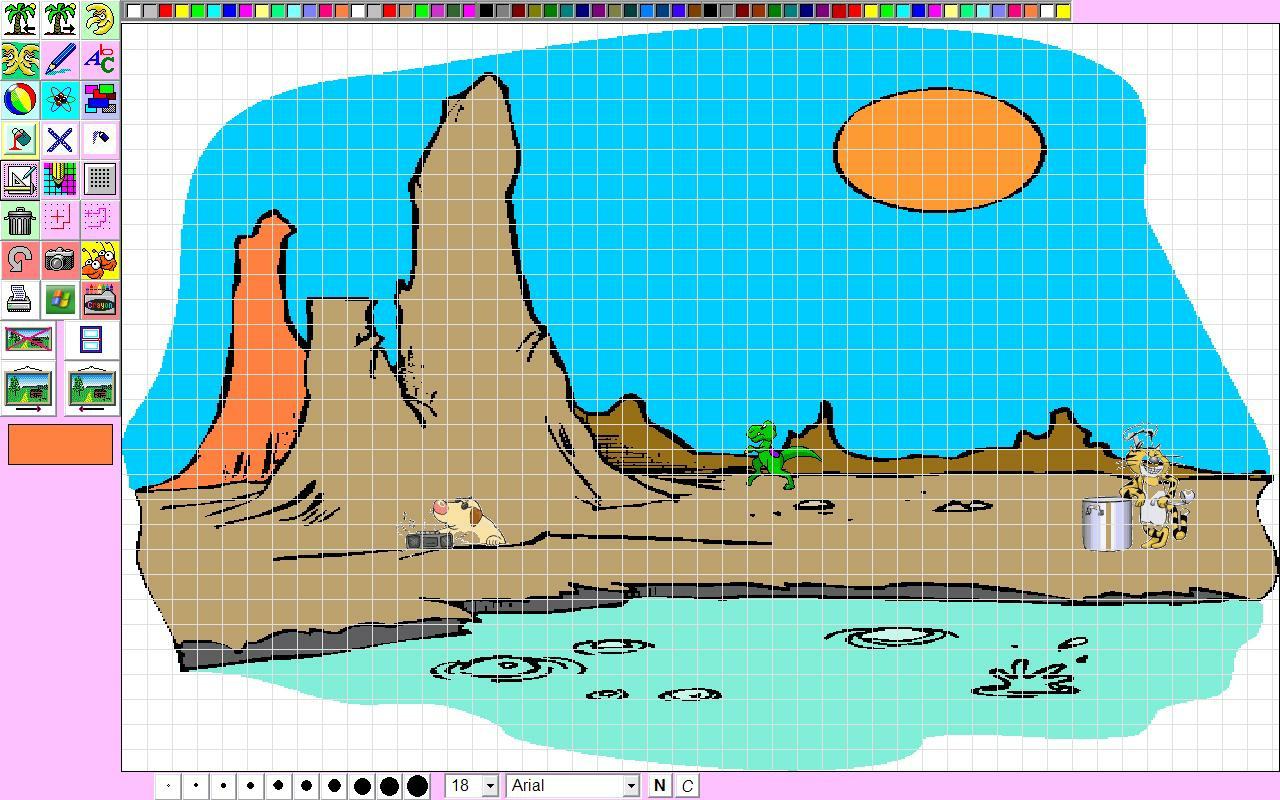
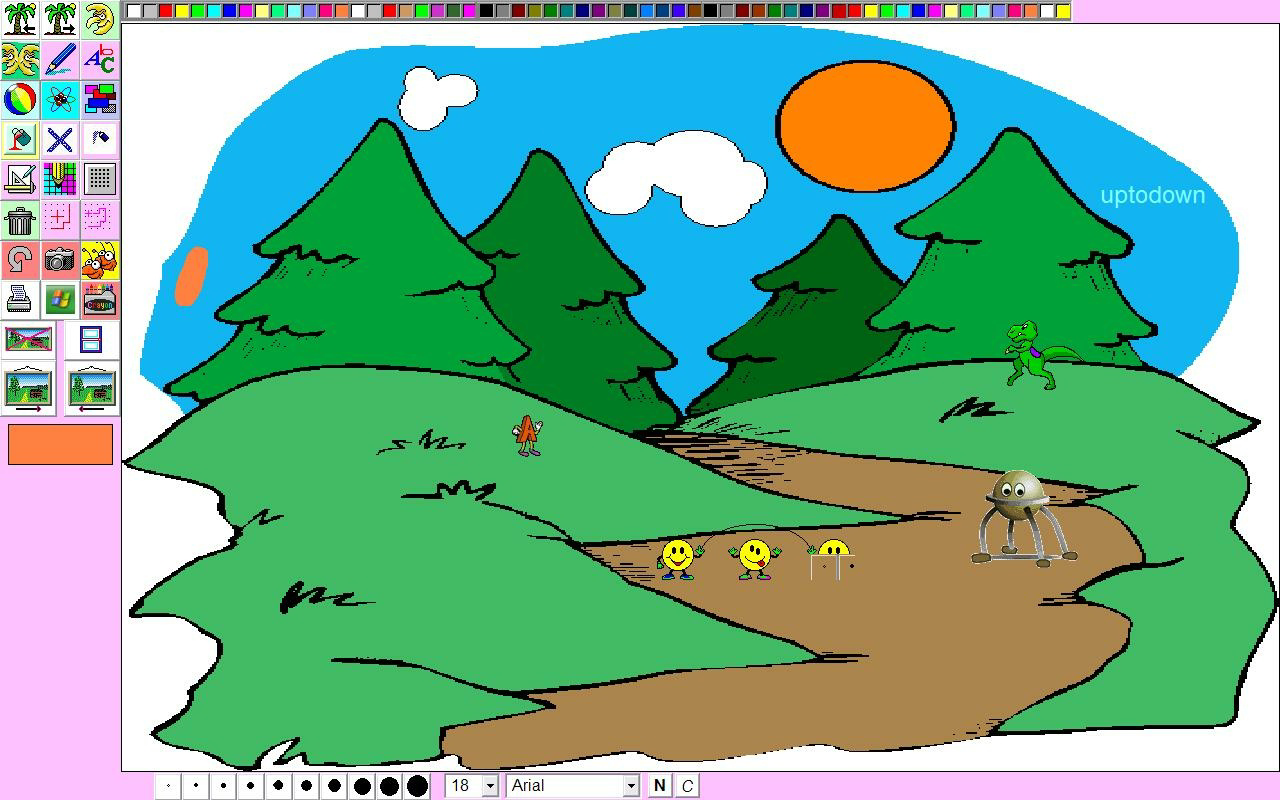
- Imaginative Scenarios: The app features themed drawing environments such as magical forests, space adventures, and underwater worlds. These scenarios inspire children to create stories and characters within a structured yet open-ended context.
- Full-Screen Mode: Activating full-screen mode removes desktop distractions, allowing children to focus entirely on their artwork. This feature enhances concentration and supports uninterrupted creative sessions.
- Animated Characters and Animals: Interactive animated elements like dancing animals, playful letters, and friendly creatures can be placed on the canvas. These dynamic additions make the drawing experience more immersive and fun.
- Nurtures Creativity: By combining visual inspiration with accessible tools, MegaPik encourages children to express emotions, ideas, and narratives through art, fostering confidence and original thinking.
For example, a child might use the space-themed scenario to draw a rocket ship with a smiling alien, adding animated stars that twinkle as they draw. Another may use the animal scene to create a jungle parade, placing moving creatures along the path. These real-world applications demonstrate how the app supports both artistic skill development and storytelling abilities in a natural, enjoyable way.
Interface, UX & Performance
The user interface of MegaPik is designed with simplicity and clarity in mind. The layout features large, clearly labeled icons and minimal text, ensuring that even young children can navigate the app independently. The visual style is bright and colorful, using cartoonish graphics and soft edges to maintain a child-friendly aesthetic. Navigation is linear and intuitive—tools are arranged in a toolbar at the bottom, with a color wheel and a selection of pre-set scenes accessible via tabs.
Responsiveness is consistent across different device categories, although the developer did not list formal performance metrics. The app operates smoothly within its intended scope, with minimal lag during drawing and animation playback. Stability appears reliable, especially considering its long availability since 2008. Although the developer did not specify minimum OS requirements, the app’s lightweight file size of 10.4 MB suggests it runs efficiently on older or lower-end systems. The full-screen mode further contributes to a distraction-free experience, enhancing usability for young users in both home and classroom environments.
Platform Compatibility & Technical Requirements
MegaPik is available on the Windows platform and requires no special hardware to run. The current version is 1.0.0, with a file size of 10.4 MB. The app is offered free of charge, making it accessible to a broad audience. While the developer did not specify minimum OS requirements or version compatibility details, the app’s long-standing presence suggests it supports a wide range of Windows operating systems, including older versions such as Windows XP, Vista, and 7.
For users seeking to install or update the app, the lightweight nature of the file size makes it easy to download and deploy across multiple devices. Compatibility with modern Windows systems cannot be confirmed without official documentation, but the app’s simplicity and low resource usage increase the likelihood of broad compatibility. Users should exercise caution when downloading from third-party sources and ensure they obtain the official version to maintain security and integrity.
Pros and Cons
- Free to download and use with no hidden costs
- Designed specifically for children with intuitive navigation
- Engaging visual themes and animated elements enhance creativity
- Full-screen mode reduces distractions and improves focus
- Lightweight file size ensures fast installation and low system impact
- Developer did not provide specific OS or device compatibility details
- Version 1.0.0 has not been updated since 2008, raising concerns about modern system support
- Limited feature set compared to contemporary drawing apps
- No cloud storage or export options were listed
- Compatibility with newer Windows versions is not confirmed
FAQ
Is MegaPik safe for children to use?
Yes, MegaPik is designed with a child-friendly interface and no external links or ads, making it a secure environment for young users. The app does not collect personal data or require internet access.
Can I install MegaPik on my modern Windows PC?
The developer did not specify minimum OS requirements, but the app’s lightweight size and long history suggest it may run on older systems. Compatibility with newer Windows versions cannot be guaranteed without official testing.
Is MegaPik available for Android or iOS?
Based on the provided information, MegaPik is currently only available for Windows. There is no official release for mobile platforms.
Does MegaPik require an internet connection?
No, the app functions entirely offline. All features, including animations and tools, are included within the local installation file.
How can I update MegaPik if a new version is released?
As of now, the latest version is 1.0.0, released in 2008. The developer has not announced any updates, so no official update mechanism is available. Users should verify the source of any downloaded files.
Final Thoughts
MegaPik remains a dedicated tool for fostering creativity in children through simple, joyful drawing experiences. While its age and lack of updates may raise questions about compatibility with modern systems, its core design—child-centered, distraction-free, and fun—still holds value in educational and home settings. The app’s strengths lie in its intuitive interface, imaginative themes, and low resource demands, making it a reliable option for parents and teachers seeking safe, free digital art tools. For families looking for a no-cost, offline drawing solution that encourages storytelling and artistic confidence, MegaPik offers a meaningful entry point into digital creativity. Download MegaPik now.
Guides & Tutorials
How to install MegaPik
- Click the Download button above.
- Once redirected, accept the terms and click Install.
- Wait for the MegaPik download to finish on your device.
How to use MegaPik
This software is primarily used for its core features described above. Open the app after installation to explore its capabilities.
User Reviews
No reviews yet. Be the first to share your experience.
You may also like
more
Que no te pillen¡
About !Que no te pillen¡Reviewed by Jason A. BilbreyShow MoreShow Less

3D Combat Zone
About 3D Combat ZoneOriginally released in 1983, 3D Combat Zone immerses players...

666: El día del portal
About 666: El día del portalOn June 6, 2006, Agent P. Stone uncovers a sinister...

80 in 1 Best Flash games
About 80 in 1 Best Flash games 80 in 1 Best Flash games is a collection of 80 fl...

ABYSS SEEKERーーWhat Do You See Deep in The Abyss
About ABYSS SEEKERーーWhat Do You See Deep in The AbyssIn ABYSS SEEKER, players...

ACA NEOGEO THE KING OF FIGHTERS 2002 for Windows
About ACA NEOGEO THE KING OF FIGHTERS 2002 for WindowsTHE KING OF FIGHTERS 2002,...